Wake up, check your phone. Work on a laptop for eight hours. Watch TV to relax. Scroll through social media before bed. Does this sound like your daily routine?
If you often finish the day with headaches, blurred vision, or dry, gritty eyes, you aren't alone. You are likely suffering from Computer Vision Syndrome, also known as Digital Eye Strain. In an age where we are constantly connected, our eyes are paying the price.
Here is what is happening to your eyes and, more importantly, how you can fix it.
Why Screens Are Different from Paper
You might wonder, "Why can I read a book for hours without pain, but 30 minutes on a phone hurts?"
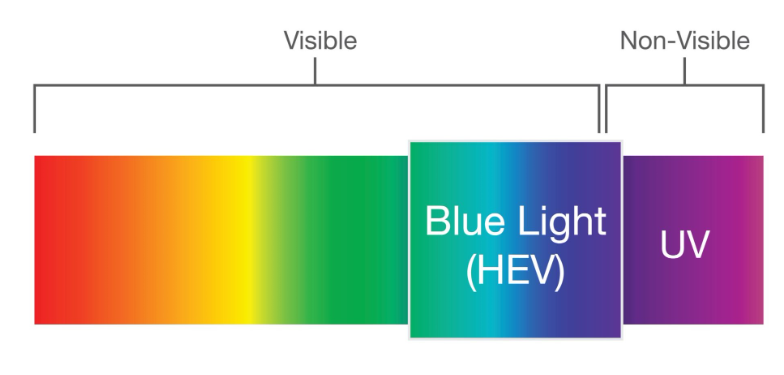
The answer lies in the light. Digital screens emit high-energy visible (HEV) light, often called Blue Light.
Unlike the printed words on a page, pixels on a screen are brightest at the center and fade toward the edges. Your eyes have a hard time locking focus on these "fuzzy" pixels, forcing your focusing muscles to work overtime to keep the image sharp.
The "Blink" Problem
Here is a surprising fact: normally, humans blink about 15–20 times per minute. But when we stare at a digital screen, that number drops to just 5–7 times per minute.
Blinking is your eye’s way of refreshing itself. When you stop blinking, tears evaporate, leading to that burning, sandy sensation known as dry eye.
Simple Steps to Protect Your Vision
You don't have to throw away your smartphone to save your sight. Small changes can make a massive difference.
1. The 20-20-20 Rule
This is the golden rule of digital eye care.
-
Every 20 minutes, take a break from your screen.
-
Look at something 20 feet away.
-
Focus on it for at least 20 seconds. This simple habit relaxes the focusing muscle inside your eye, preventing it from locking up (a condition called accommodation spasm).
2. Adjust Your Lighting
Your screen should not be the brightest thing in the room. If you are working in a dark room with a bright monitor, your eyes are constantly adjusting between the dark surroundings and the bright light. Turn on a lamp or dim your screen to match the ambient lighting.
3. Consider "Computer Glasses"
If your job requires hours of screen time, standard reading glasses might not be enough.
-
Blue Light Blocking Lenses: These filter out harmful high-energy blue light, reducing glare and improving sleep cycles.
-
Anti-Fatigue Lenses: These have a small "boost" of power at the bottom of the lens to help your eyes focus up close with less effort.
When to See a Doctor
If you have tried these tips and still get headaches or blurry vision, it might not just be eye strain—it could be an uncorrected prescription. Even a tiny amount of astigmatism can cause massive headaches when combined with computer use.
Don’t let your work destroy your vision.
Struggling with screen fatigue? Visit Ziki Eye Care today to explore our range of Blue Light blocking lenses and specialized computer eyewear.